Manage payment account settings
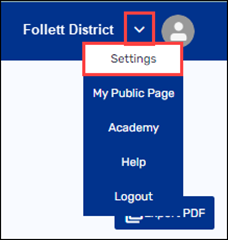
1. In the top-right corner, hover over the down arrow, then click Settings.
2. Under Payment Settings, select General. The General Payment Settings page appears.
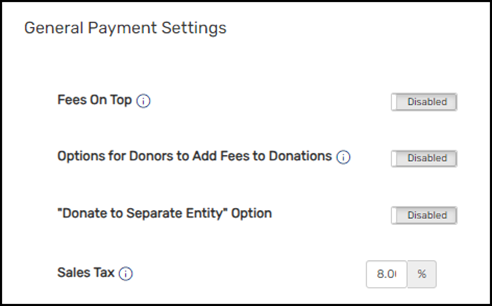
3. Do any of the following:
|
If you want to enable… |
Then… |
|---|---|
|
Fees On Top Note: This setting automatically adds the Fundraising Manager fees to the donation. |
a. Click Disabled to change the button to Enabled. 
b. Click Save. |
|
Options for Donors to Add Fees to Donations Note: This setting lets the donator select whether or not to add the Fundraising Manager fees to their donation. |
a. Click Disabled to change the button to Enabled. Additional fields appear. 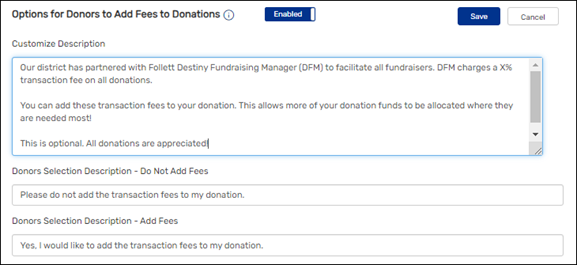
b. Edit the description, the Do Not Add Fees section, and the Add Fees section. c. Click Save. |
|
"Donate to Separate Entity"Option |
a. Click Disabled to change the button to Enabled. Additional fields appear. 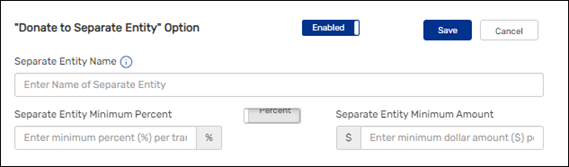
b. Enter the Separate Entity Name. c. Click the Percent/Amount toggle to the desired position. d. Do one of the following:
e. Click Save. |
|
Sales Tax |
Enter the correct sales tax percentage. |
For additional help, contact techsupport@follettsoftware.com.